


Dolly Casino Mobile: How to Play Without a Native App
Dolly Casino's mobile platform runs through the website rather than a separate native Android or iOS application. Slots, live-dealer tables, sportsbook markets, account access and the cashier remain available in a compatible mobile browser, so switching from desktop does not require a second profile or a separate balance. For players searching for a Dolly Casino app, the important distinction is how mobile access is packaged. Dolly Casino provides a Create Shortcut function that places the website on your Home Screen and gives you a quicker way to return to it. The shortcut looks similar to a regular mobile app, but it still opens the web platform.
This also changes what a Dolly Casino app download means in practice. Instead of finding a separate casino package in an app store, you open the website and save its shortcut directly to your device. The Android and iOS setup takes only a few steps, which we cover below.
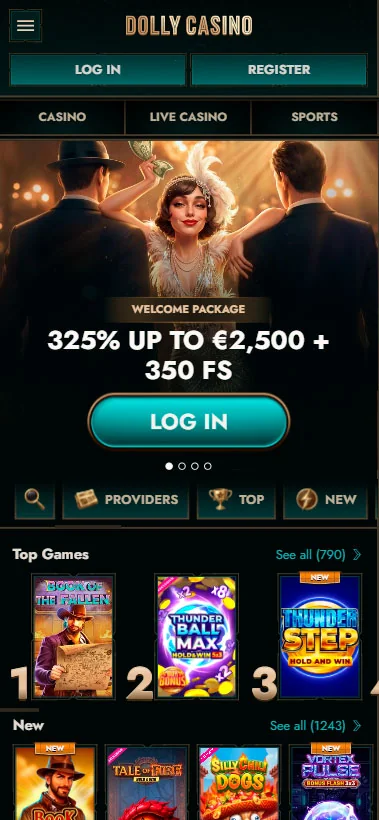
Setting Up the Home Screen Shortcut
The shortcut is essentially a direct entrance to the mobile website. It removes the need to search for Dolly Casino each time you want to return, while your login, games, transactions and promotions continue to run through the browser-based platform. The instructions are slightly different for Android and Apple devices, but both methods lead to the same web version of the casino.
Adding Dolly Casino on Android
On Android, the setup may first offer an option to install the site through the available link. If that route does not complete the setup, the browser menu provides a simple alternative.
Follow this sequence:
- Open Dolly Casino in your Android browser.
- Try the available site-install option.
- If it does not work, tap the three-dot menu in the upper-right corner.
- Scroll through the browser menu and choose Add to Home screen.
- Enter the name you want to see beneath the shortcut.
- Confirm, and the browser will add the icon to your Home Screen.
This is the practical Dolly Casino download process on Android. The shortcut leads back to the website, so there is no reason to search for unrelated APK files when browser access is already available. After adding the shortcut, open the icon once to make sure it takes you to the expected Dolly Casino page rather than an old browser tab.
Adding Dolly Casino on iOS
The Dolly Casino iOS route uses the sharing controls built into Safari. Open the website, tap the Share icon shown as an arrow leaving a box, then scroll through the menu until Add to Home Screen appears. Tap that option and confirm the shortcut. The resulting Home Screen icon works as a fast browser entry rather than an App Store installation, and removing it later will not delete your casino profile because the account information remains connected with Dolly Casino.
For anyone searching for a Dolly Casino app download on an iPhone or iPad, this is the setup that matches the current mobile access model.
What You Can Do from Your Phone
The browser route is not limited to checking a balance or opening a few simplified games. The same account covers registration, login, payments, casino sections and sports betting, which makes a phone useful for much more than occasional account checks. The main difference is the smaller screen and touch-based navigation, not the underlying player account.
Registering and Logging In on Mobile
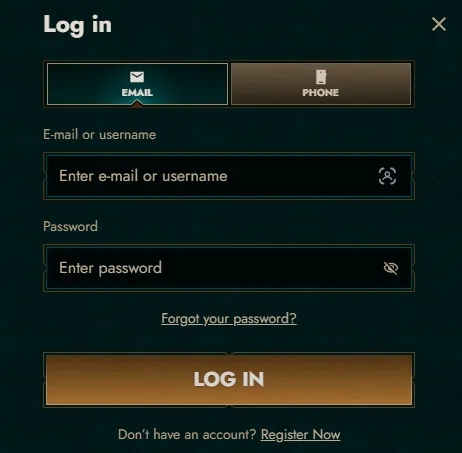
New players can complete the same two-stage registration in a mobile browser. The first screen asks for an email address and password, includes the required 18+ and Terms & Conditions acceptance, and then moves to the personal-information stage. First name, last name, date of birth, country, currency, phone number, city, address and postcode are completed before the account is created. Returning users see the regular login panel. It provides E-mail or username and Password fields, together with EMAIL and PHONE tabs for switching between the available access methods. The Forgot your password? link opens the email-based recovery route when the existing credential is no longer available.
The Dolly Casino mobile app wording therefore does not represent a separate mobile account system. Registration and login still belong to the same profile that you can later open from a desktop computer.
Depositing and Withdrawing on the Go
The cashier remains part of the account when you access Dolly Casino from a phone. Cards, bank transfer, MiFinity and a broad range of cryptocurrencies are available according to the payment methods shown for the player profile.
Some of the main EUR limits are:
| Payment Method | Deposit | Withdrawal |
| Card | €10 to €2,000 | €10 to €3,000 |
| Bank Transfer | €10 to €5,000 | €10 to €5,000 |
| MiFinity | €10 to €2,500 | €10 to €2,500 |
| Revolut | Not listed for deposits | €10 to €5,000 |
Crypto access is broader. USDT is available through ERC20, Solana, BEP20 and TRC20, while the cashier also lists Bitcoin, Bitcoin Cash, Ethereum, Litecoin, TRX, USDC, USDC Solana, BNB, DOGE, Solana and Cardano. Most crypto deposits range from €10 to €5,000, although Bitcoin starts from €30. Most withdrawals begin at €20, while Bitcoin starts at €60, with a €5,000 upper limit shown for the listed crypto methods.
There is no separate set of mobile payment limits in this account structure. The Dolly Casino app shortcut simply gives you another route into the same cashier.
Playing Slots, Live Casino and Placing Bets
Casino browsing is extensive on mobile, with more than 10,000 slots available in the catalogue. The wider game menu also includes jackpots, instant games and live-dealer categories, so search and category filters become useful when the screen is smaller. Live Casino contains Roulette, Blackjack, Baccarat & Dice, Poker, Game Shows, Gold Saloon and International Tables. Individual tables can have very different stake ranges: Speed Roulette is available from €0.10 to €20,000, while Blackjack 77 - Ruby has stakes from €50 to €5,000.
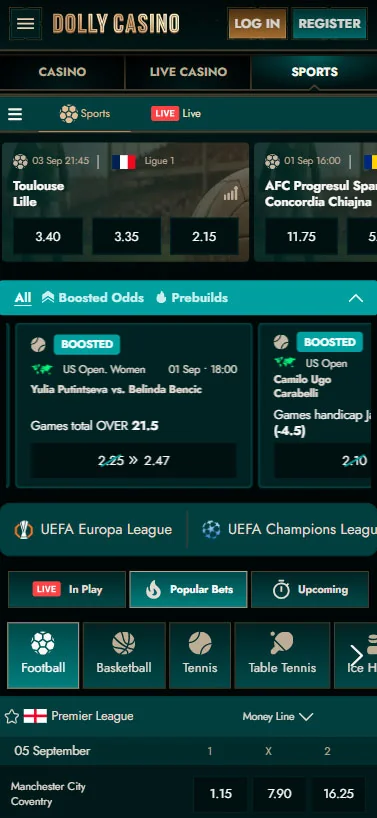
Sports betting works through the same mobile website. In-Play events, pre-match markets and Boosted Odds can be opened from the sportsbook. Football, basketball, tennis, table tennis, ice hockey and American football sit alongside esports and less common disciplines, while the Bet Slip remains available for managing selections.
This makes the Dolly Casino mobile app experience relevant to both sides of the platform. You can move from the slot catalogue to a football market without installing separate casino and sportsbook products.
Mobile Browser vs Native App: What's the Difference
A native application is software installed specifically for Android or iOS and distributed as its own application package. A Home Screen shortcut is different because the icon is primarily a convenient route into a website that continues to depend on the browser and an internet connection.
Dolly Casino currently uses the second approach. For ordinary account use, the difference can feel small because the shortcut removes several navigation steps. You tap an icon and return directly to the site, while updates to games, promotions and account pages continue to come through the web platform rather than a separate app package.
This is why searches for Dolly Casino download can be misleading. For the available mobile route, you need a current browser and the Create Shortcut function.
Tips for a Smoother Mobile Session
A browser-based setup leaves some of the performance in the hands of your phone, browser and internet connection. Keeping all three in reasonable condition helps more than repeatedly deleting and recreating the shortcut. Use a current browser version before setting up Create Shortcut. An older browser can display pages incorrectly or hide menu options that newer versions show more clearly. If the add to Home screen is missing, check the browser menu again, update the browser where necessary and confirm that the website loads normally.
Connection quality matters even more once live content starts. A basic slot or account page can tolerate more fluctuation than a live-dealer video or an In-Play sports market, where odds and event status may change while you watch. Before placing a time-sensitive live bet, make sure the connection is stable and review the Bet Slip carefully before confirming the selection.
It is also practical to add the shortcut shortly after registration if you expect to use the site regularly. This saves you from searching for the website again and keeps one familiar access route on your own device. For Dolly Casino Android access, use the browser's three-dot menu when the direct installation option does not work. For Dolly Casino iOS access, return to Safari's Share menu and Add to Home Screen. One security habit is worth keeping regardless of the operating system. Save the shortcut on your own phone, but avoid storing casino login credentials on a device shared with other people.
Conclusion
Dolly Casino does not need a separate native application to make its main platform available on a phone. Registration, login, slots, live casino, sports betting, deposits and withdrawals remain accessible through a mobile browser, while Create Shortcut turns the website into a Home Screen icon for faster return visits. The Dolly Casino app download process is therefore simpler than installing conventional casino software. Android users can add the site through the browser menu, while iOS users can do the same through Safari's Share controls. Both routes lead back to the original player account.
For regular mobile use, keep the browser current, use a stable connection for live content and create the shortcut only on a device you control. This provides the practical benefit people often expect from a Dolly Casino download without creating a separate account or searching for an unofficial installer.
FAQ
You Might Also Like

Dolly Casino Bonuses: Every Offer Explained
The promotional system goes well beyond one welcome banner.
Dolly Casino Login and Registration: Access Your Account
Opening a new profile or returning to an existing one takes place through two separate routes. Dolly Casino sign up starts with an email address and...