


Access Your Personal Gaming Dashboard!
Log in to access exclusive daily rewards.
Open Player DashboardDolly Casino Login and Registration: Access Your Account
Opening a new profile or returning to an existing one takes place through two separate routes. Dolly Casino sign up starts with an email address and password, continues with personal and contact details, and can later move into identity checks when the account needs verification.
Existing players use the Dolly Casino login screen instead, where they can enter an email or username, switch to phone access, recover a forgotten password and return to the profile they already created. Registration itself only takes a couple of screens, but accuracy matters because the information entered here can later be compared with identification, proof of residence and payment records. Below, we go through both flows in order, including Dolly Casino verification, password recovery and mobile access.
Choosing Your Welcome Bonus Before You Sign Up
The welcome choice appears before the main registration form, which means new users can decide what type of opening offer they want before completing their account details. Four options are displayed, covering casino, sportsbook and crypto deposits.
| Welcome Choice | Current Offer |
| Casino | 325% up to €2,500 + 350 FS |
| Sport | 100% up to €100 |
| Casino Crypto | 200% up to 3,000 USDT |
| Sport Crypto | 100% up to 200 USDT |
The same screen also includes “I have a promo code” and “I do not want a Welcome Bonus”. Choosing the second option allows you to continue without attaching one of the four welcome packages. Players who have already completed Dolly Casino registration do not need to go through this screen again because the page also provides an “Already have an account? Log in” link that leads directly to the existing-account flow.
This early choice matters because casino and sports promotions follow different eligibility and wagering rules. Pick the route you actually intend to use rather than selecting the largest headline automatically.
Creating a New Account at Dolly Casino
The Dolly Casino sign-up process itself is divided into two numbered stages. The first creates the basic credential pair and records the required age and terms acceptance, while the second adds the identity and contact details that form the player profile. There is no need to enter everything on one long page. The form moves forward through “Next Step” and finishes with “Create account” once the second group of details is complete.
Step One: Email and Password Setup
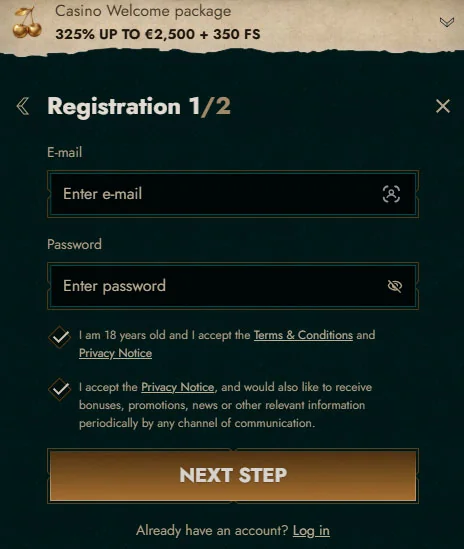
The first Dolly Casino registration screen asks for an email address and password. Below those fields is a mandatory checkbox confirming that you are at least 18 years old and accept the Terms & Conditions and Privacy Notice. A second checkbox deals with marketing rather than account eligibility. It allows you to agree to receive bonuses, promotions, news and other relevant communications through available contact channels. This preference is separate from the mandatory age and legal-consent checkbox, so it does not need to be treated as the same decision.
After entering the required information, select “Next Step”. This moves the Dolly Casino sign-up process into the personal-details stage without creating a second or separate profile.
Step Two: Personal and Contact Details
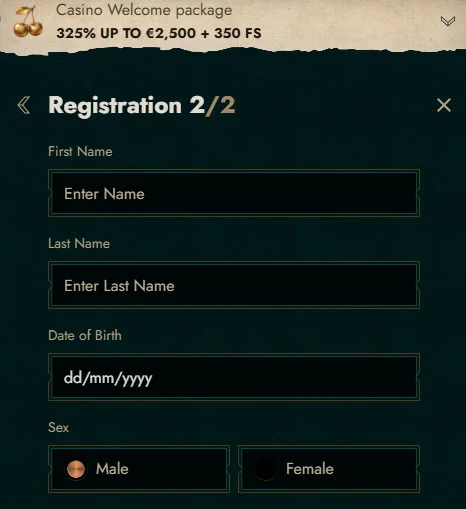
The second screen collects the information used to identify the account holder. It asks for First Name, Last Name, Date of Birth in dd/mm/yyyy format, Sex, Country, Currency, Phone, City, Address and Postcode. The phone field is mandatory and appears with the relevant country code. The available country and currency fields depend on the selected market. These entries should match the details you actually use because the operator can later compare account information with identity, address and payment evidence. Once everything is complete, the final “Create account” button finishes the Dolly Casino registration process.
Before submitting it, check names, date of birth, phone number and address rather than relying on browser autofill, especially when the device stores data from another person.
Verifying Your Identity After Registration
Creating the profile and completing KYC are related but separate stages. Dolly Casino verification can be requested to confirm identity, age, residence, payment ownership or source-of-funds information, particularly around financial transactions and bonus-related account checks. The important part is consistency. Information on the account should match the documents later supplied, and requested evidence needs to be submitted within the stated deadline.
Documents Required for KYC
The verification process can ask for a properly certified identity document, proof of residence and evidence connected with the payment method used on the account. Transaction histories, bank statements or card documentation may therefore become part of the check when payment ownership needs to be established.
Typical requests can include:
- an ID document such as a passport, identity card or driving licence;
- proof of residence;
- bank or payment transaction history;
- proof that the deposit or withdrawal method belongs to you.
The exact package depends on what needs to be verified. Dolly Casino verification can also include additional security procedures when the account requires a closer review.
Verification Timelines
Once a request is made, players have 30 days to provide the requested documents and information.
After the complete response has been received, the normal review period is up to 10 days, although a more complicated case can require additional checks and extra time. The operator can also use phone verification, facial verification or other security procedures when necessary. During that process, withdrawals can be held until the relevant checks are completed, which is why providing a complete package in one submission is usually cleaner than sending documents separately over several days.
Logging Into Your Dolly Casino Account
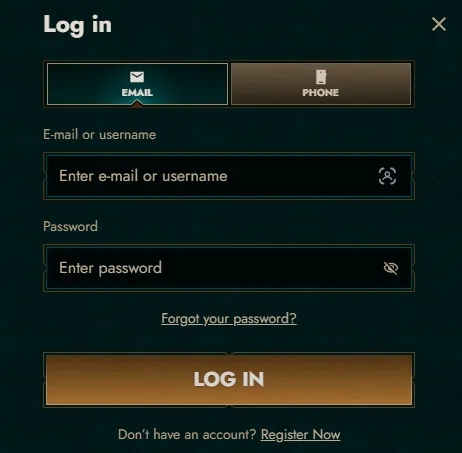
Returning players do not need another registration. The Dolly Casino login panel is the route back into the same balance, account settings and profile information created during sign-up. The screen is compact, with the credential fields in the centre and recovery immediately below them.
Email, Username or Phone Login
The default login view contains “E-mail or username” and “Password” fields. At the top of the same panel, the EMAIL and PHONE tabs allow you to change which credential route you are using. Below the password field is “Forgot your password?”, followed by the main “LOG IN” button. New visitors who reached this screen by mistake can use the “Register Now” link instead and move into the Dolly Casino registration process.
For a normal Dolly Casino sign-in, enter the credential connected with the existing profile rather than trying to create another account when an old password no longer works. Recovery is the correct route for forgotten access details.
Switching Between Login Methods
The EMAIL and PHONE tabs give existing players some flexibility in how they access their accounts. Under the email route, the form accepts an email address or username together with the password, while the second tab changes the screen towards phone-based access. The Dolly Casino sign-in options available in the account interface are the ones worth following. If one method does not match the details originally attached to your profile, return to the credential you know is registered rather than repeatedly trying unrelated information.
Recovering a Lost Password
Forgotten credentials do not require another Dolly Casino sign-up. Selecting “Forgot your password?” opens a dedicated recovery window containing a single E-mail field and instructions to enter the address where reset instructions should be sent.
After submitting the email through “Reset Password”, check the inbox attached to your profile. The recovery message provides the next instructions for changing the credential, while a Help Centre link remains available directly from the same window if the expected message does not arrive. Before repeating the request several times, check spam, junk and filtered folders and confirm that the address was typed correctly. Once the password is changed, use the newest credential for the next Dolly Casino login attempt and update any old password saved by the browser.
Keeping Your Account Secure
Account protection is not limited to choosing a difficult password.
The terms also set rules around ownership, duplicate profiles, login confidentiality and accurate personal details, all of which can affect what happens to transactions and winnings if the account is later reviewed. Treat the Dolly Casino account as personal. Do not share the login details, buy or transfer another player's profile, or allow someone else to place transactions using credentials registered in your name.
One Account Per Player Rule
Only one account is permitted per person, household, address, telephone number, email address or IP address. Any additional profile can be classified as a Duplicate Account, including one opened with alternative or false credentials.
The consequences can be substantial. Activity performed through the duplicate can be treated as void, associated promotions can be cancelled, winnings can be removed, and already processed withdrawals can be reversed and become owed back to the operator. The duplicate profile can then be closed without the option to reopen it. This is why a failed Dolly Casino login should be solved through password recovery or support rather than another registration. A new profile can turn a simple access issue into a duplicate-account review.
Age Requirements and Self-Exclusion
Players must be at least 18 and also meet any higher legal age requirement that applies where they live. Registration by an underage person is prohibited, and winnings obtained by an underage player can be cancelled. Self-exclusion is available separately from ordinary account closure. A player who wants to exclude themselves can contact support@dollycasino.com, after which the account can be closed as soon as practicable. The player is also expected to disclose other accounts and refrain from opening additional ones during exclusion.
These controls remain relevant regardless of bonuses or account status. The objective is to stop access, not to create a replacement profile later.
Accessing Your Account on Mobile
There is no separate native app required for the current mobile access route. Registration and Dolly Casino login work through the mobile website, and the Create Shortcut feature can place a direct icon on the Home Screen for quicker repeat visits. On Android, open the site in the browser, tap the three-dot menu, find “Add to Home screen”, choose a shortcut name and confirm. On iOS, open the site in Safari, tap the Share icon and choose “Add to Home Screen”. In both cases, the icon takes you back to the web version rather than creating another Dolly Casino account. The same credentials continue to work when you move between desktop and phone. For a Dolly Casino sign-in on a shared device, avoid saving the password and log out completely when you finish.
Conclusion
The account journey is fairly linear. First, you choose a welcome option or decline one, then Dolly Casino sign-up collects the basic credentials and personal details, and later KYC can confirm identity, residence and payment ownership when required. Existing players bypass that registration path entirely and return through the login panel using email, username or phone access. Password recovery stays attached to the original profile, while the one-account rule makes creating a duplicate an unnecessary and potentially costly workaround.
The most useful habit is simple: enter accurate information during Dolly Casino registration, keep access to the registered email and use the recovery and support tools whenever the original profile needs attention.
FAQ
You Might Also Like

Dolly Casino Bonuses: Every Offer Explained
The promotional system goes well beyond one welcome banner.
Dolly Casino Mobile: How to Play Without a Native App
Dolly Casino's mobile platform runs through the website rather than a separate native Android or iOS application. Slots, live-dealer tables,...